vise Data Run · everyday data changes
Business teams prepare bulk SAP changes. IT keeps control.
Mass changes to materials, vendors, prices, plant-maintenance and business-partner data — validated, dry-run, approved by a named person and posted through standard SAP interfaces, with the audit trail written for you. Your ticketing stays where it is; what changes is everything after the ticket. SAP ECC and S/4HANA; IBM Maximo too.
- In production
- at a global brewing group, SAP and IBM Maximo
- Every post
- dry-run through the real interface first
- Four-eyes
- requester, owner, validator, executor — separate roles
01 · The problem
Most SAP data problems don’t come from a missing transaction.
They come from the process around the data: spreadsheets, e-mail approvals, manual mass updates repeated market by market, and more than ten rounds of corrections between business and IT per file. A small group of specialists sits between every regional update and the live system. Nothing is reusable. Nothing is auditable.
02 · The six steps
Validated before SAP. Controlled during. Auditable after.
- Step 01 · RequestAn Excel template, not a free-text ticket.Business users fill a standardised template for the object and scenario — material, vendor, price, equipment, business partner. Scope, rules, risk level and deployment window travel with the file. Your ticketing stays where it is; the request arrives in a form the next steps can check.
- Step 02 · ValidateChecked against SAP reference data and your rules before it gets near SAP.Required fields, types, allowed values, cross-field dependencies, duplicates, references and business logic. Errors come back per row with the reason, so the requester fixes them before anyone in IT looks at the file.
- Step 03 · SimulateDry run through the real interface.The change is run against the target as a test call — the same BAPI, IDoc or OData the real post will use, in test mode with no commit; the connector for IBM Maximo. Your live customizing and reference data answer, not a copy of them. The dry run never writes. What it rejects comes back per row before the post; what it passes is as close to the real post as SAP allows, and the real post still runs with per-record error handling.
- Step 04 · ApproveFour-eyes, by role, with a name on it.Requester, data owner, validator, executor and admin are separate roles. Nothing is posted without an approval that carries a user and a time.
- Step 05 · LoadControlled execution: batching, monitoring, correction queue.Posting through standard, SAP-supported interfaces — never a direct table write — so SAP’s own checks, number ranges and change documents stay active. Execution logs per batch; failed records go to a correction queue while the rest continues.
- Step 06 · AuditWho, when, what, on which file, with what result.The source file, the submitter, validation results, approvals, execution status and the system’s responses are kept for every run. Reconciliation and change log per request — the package an auditor asks for, produced as a by-product.
03 · What the operator sees
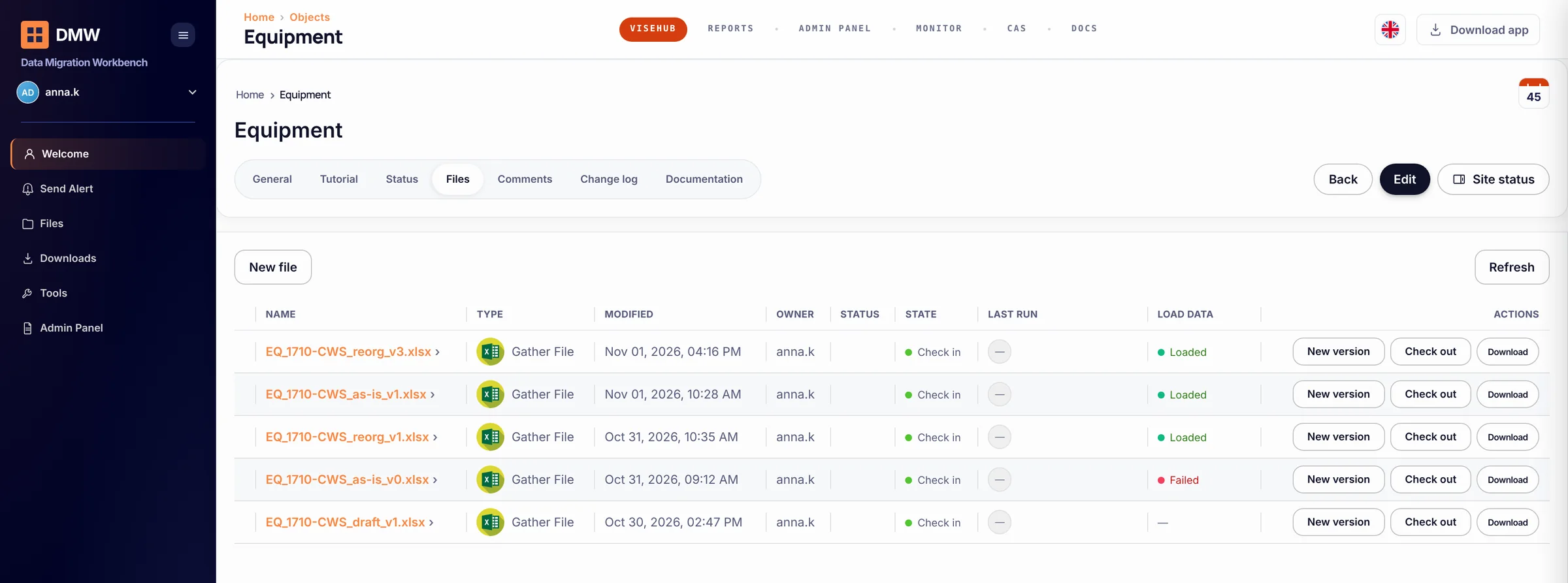
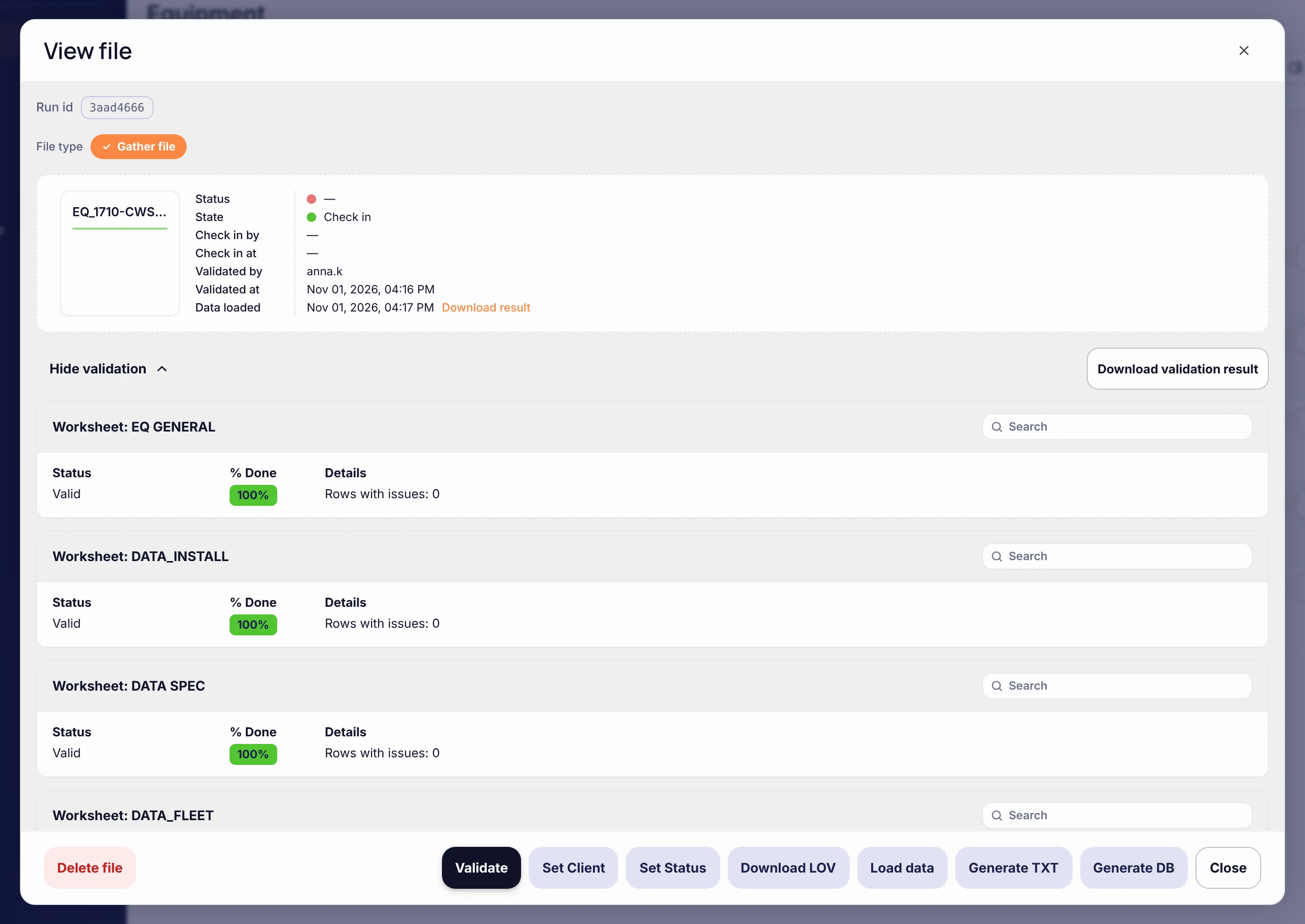
One file, one trail: who checked it in, what validation said, when it was loaded.
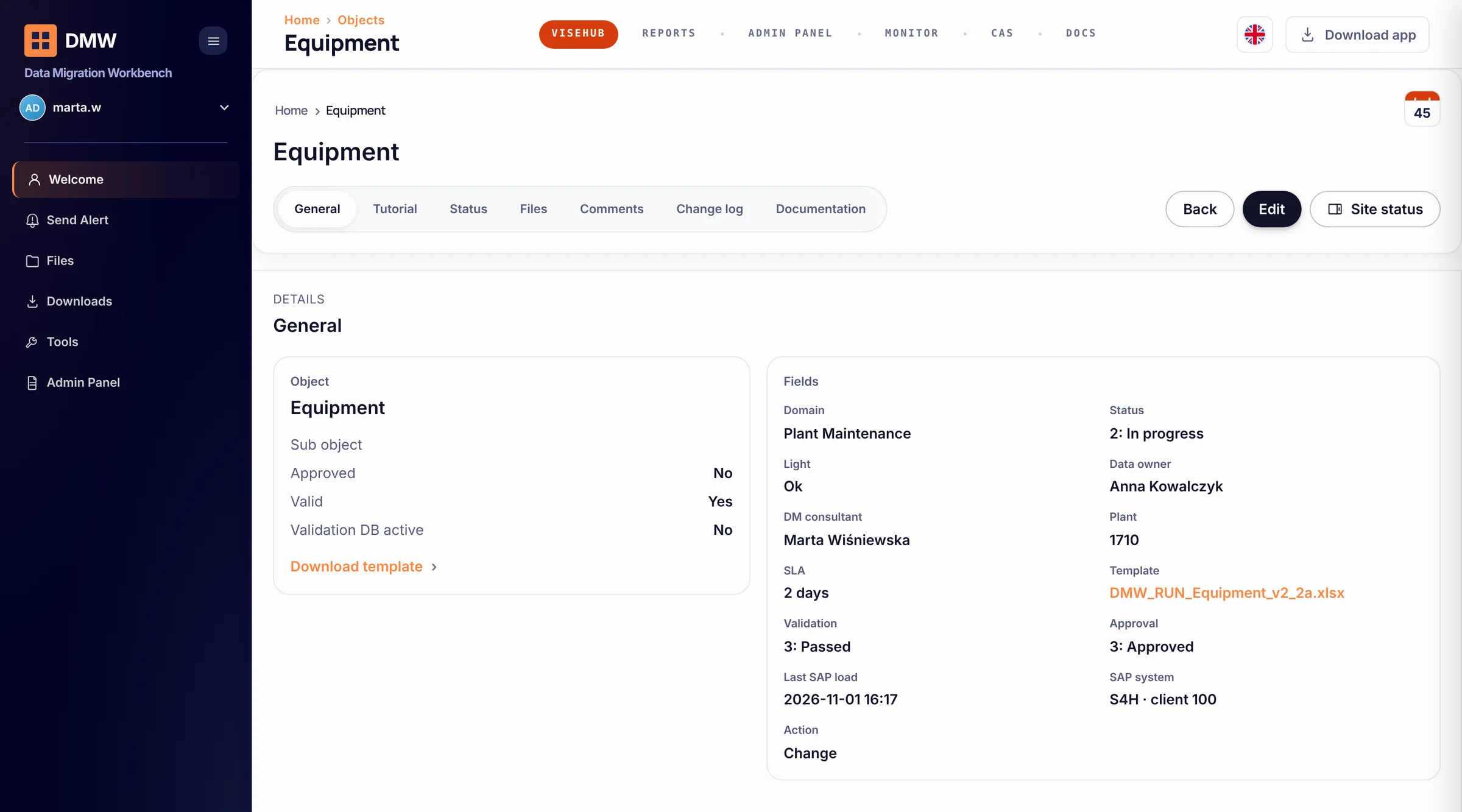
Every change is a file against an object. The object page lists the files in flight with their state and last result; the file view shows the validation per worksheet and the load, with a name and a time on each step. No spreadsheet attached to an e-mail, no “who ran this?”.
04 · Case · SAP Plant Maintenance
Five PM object groups, standardised across more than ten European markets.
A global brewing group — our longest-standing customer — running SAP across 15 countries, in Europe and beyond replaced spreadsheets, e-mail approvals and manual mass updates with vise Data Run: central governance, local data ownership, 16 trained expert users in four regional clusters. End users prepare and load their own data through standardised Excel templates — no ABAP, no custom development per change. New markets adopt processes already configured and tested elsewhere.
Read the case| Object group | Scope |
|---|---|
| Equipment | Master records, attributes, planner groups, work centres, naming |
| Equipment BOM | Components, item data, links to parent equipment |
| Functional locations | Hierarchy, structure indicators, organisational data, naming |
| Maintenance plans | Scheduling parameters, cycles, items, alignment to central strategies |
| Task lists | Operations, work centres, control keys, durations, harmonised across markets |
05 · For SAP application managers
What happens in your SAP system.
The questions Basis, security and audit ask before a pilot, answered the same way every time.
- 01Connection and identity
- Data Run posts through SAP’s standard interfaces under an interface user your Basis team creates and scopes — objects, plants, company codes — the way any integration is scoped. No table access, no custom ABAP per change. SAP change documents carry that user; Data Run’s trail carries the named requester, approver and executor behind every run.
- 02Validation and dry run
- Rules first (format, mandatory, allowed values, cross-field, duplicates), then a test call to SAP with the same BAPIs, no commit — your customizing and reference data as they are at that moment. Nothing is written during validation. Because reference data can change between validation and post, the post itself still runs with per-record error handling.
- 03Approval and separation of duties
- Requester, data owner, validator, executor and admin are separate roles, assigned per site. Which person may hold which role — and whether a requester may ever approve — is your configuration decision, written into the setup with you, not a default we choose for you. Every approval carries a user and a time.
- 04Execution and partial failure
- Posts run in batches with execution logs. A rejected record goes to the correction queue with SAP’s message; the rest of the batch continues; corrected records are re-posted. Mass master-data changes cannot be “undone” in SAP, so the model is change mode with the previous file kept as the reference — not a rollback promise.
- 05Where the history lives
- In Data Run: every file version, who checked it in, validation results per worksheet, approvals, execution status and SAP’s responses, per request. In SAP: the change documents SAP writes itself. Retention follows your project settings; the trail is exportable for an audit request.
- 06Who maintains the rules
- Validation rules and value lists are configuration per object and site. Your data steward maintains them after onboarding; new objects and non-standard business rules are set up with us — in the pilot you see where configuration ends and set-up work begins.
06 · Fits what you have
Nothing in your landscape is replaced.
07 · Operating models
Run it yourself, with us, or let us run it.
Global brewing group — everyday changes for operating companies across the group: plant maintenance, business partners, FI/CO. External execution with a Visehub specialist embedded on Teams.
08 · FAQ
Questions we get.
- 01We already use ServiceNow. Do we have to replace it?
- No. You keep ServiceNow, Jira or e-mail for intake; vise Data Run standardises what happens after the ticket — the template, the validation, the dry run, the approval and the post. The hand-over is the template attached to the ticket; a direct ticket-to-request integration is on the roadmap, not in the product today, and we say so before you plan around it.
- 02We already have scripts for mass changes.
- A good script can validate and log. What it rarely has is the process around it: a template the business can fill, a dry run before every post, an approval by a separate role, and one audit trail for every run — maintained once, not per script, and not dependent on the person who wrote it. Data Run keeps the speed of a script and standardises the rest.
- 03Which systems?
- SAP ECC and S/4HANA through BAPI, IDoc and OData; IBM Maximo through a ready connector; other systems through the Python API.
- 04How long until it runs?
- A 30-day pilot on one use case — one object, one country — then scale-up object by object. Most of the time goes into your rules, not into installation: it is cloud-based and needs a browser and a secure connection.
- 05What do we need for the pilot?
- One object and one country — the change your team dreads most. On your side: a data owner who knows the rules, an SAP (or Maximo) test system with a user for the standard interface, and a secure connection. We build the template and the rules, run the validation and the dry run with your team, and post the first real change under four-eyes. Fixed price for the eight weeks. What you measure: handling time per request before and after, corrections done by your specialists, errors caught by validation before SAP, and whether the audit trail answers your auditor’s questions without a spreadsheet.
- 06What drives the cost after the pilot?
- Sites and user accounts in scope (admin and regular), and the operating model — your IT runs it, hybrid, or Visehub runs it under SLA. The more sites, the lower the price per site. Ask for the model that matches your volume; we do not publish a price list.
- 07Is this the same thing as vise DMW?
- Same validation discipline, different job. vise DMW runs migration programmes and data quality before go-live; Data Run runs the recurring changes after go-live. Validation rules and value lists built in DMW during the migration are reused in Data Run after it.
One use case, one country, eight weeks.
Pick the change your team dreads most. We template it, validate it, dry-run it and post it under four-eyes — then you decide how far to scale. Your side: a data owner, a test system with an interface user, a secure connection. Fixed price for the eight weeks; you measure handling time, specialist corrections and what validation caught.